GUIMath Components & Blocks
GUIMath has several Component classes which define how LaTeX is generated.
- What Are Components?
- Writing Your Own Components
What Are Components?
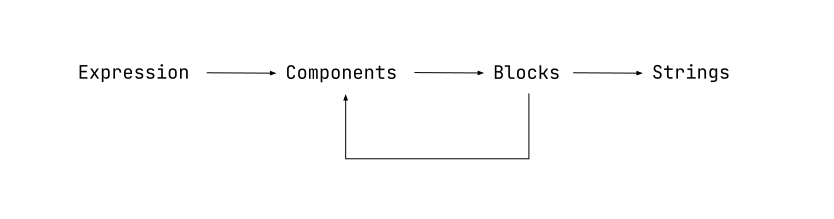
Each object you insert as part of an equation - a character, symbol, function, etc. corresponds to a particular Component class. For example, consider the equation
\[z = \frac{x}{y}\]Internally, this equation is made up of multiple Components. Each character is represented by a TextComponent class, in this case, the characters “z”, “x”, and “y”. Moreover, the fraction is represented by its own Fraction component class.
Each component is made up of blocks. A block is just a generic container that represents a part of the component. For example, the TextComponent has only one block which stores the character it is representing. The Fraction class has two blocks - one stores the content of the numerator and the other stores the content of the denominator. Each block can store a single character (as in case of the TextComponent’s block) or another component class, allowing for nesting components.
Writing Your Own Components
If you want to add a function to the editor widget that is not present out of the box, you will need to write a component class that will inherit from one of GUIMath’s built-in component classes. You will then have to define how the component is rendered into HTML and LaTeX by defining the toHTML() and toLatex() methods.
To identify which component class you should inherit from, determine how many blocks your function has. For example, a fraction has two blocks - the numerator and the denominator, and the square root function has just one block. As a guideline, you can usually consider each {} in the LaTeX representation of a function as a block - fraction is written as \frac{}{}, therefore it has 2 blocks, and square root is written as \sqrt{}, and therefore has only 1 block.
Once you determine which component class to inherit from, you will need to override the toHTML() and toLatex() methods.
For any questions about implementing custom components, please start a discussion on GitHub
Defining toHTML(cursorBlock, cursorPosition)
This is where you will be able to define how the HTML is generated for your function. See the examples below to get a quick idea of how to implement this method. toHTML() is supplied two arguments:
cursorBlock- TheBlockinstance that the cursor is currently incursorPosition- The position of the cursor within the block it is in (Number)
You will likely not need to use these arguments yourself in your implementation. They are used during rendering to provide feedback for hover and click events, and to highlight which Block the cursor is currently in. All this is handled by the GUIMath and Block class for you. However, it is important that you pass these same arguments to any recursive calls to toHTML() you make to preserve this functionality.
You should return a string containing what the HTML representation of the component should look like in the editor window. For more guidance on how to implement this method, see the examples below or start a discussion on GitHub.
Defining toLatex()
This is where you will be able to define how the LaTeX is generated for your function. See the examples below to get a quick idea of how to implement this method.
Inside the toLatex() method, you can access the blocks attribute of the GUIMath instance, and call toLatex() for each block to construct the final LaTeX expression step-by-step. There is an example implementation under each heading below to demonstrate. For more guidance on how to implement this method, see the examples below or start a discussion on GitHub.
One Block Component
Inherit from this class if your function has one block. Examples of functions which have one block include square root ($ \sqrt{\boxed{}} $), sine ($ \sin{\boxed{}} $), sine squared ($ \sin^{2}{\boxed{}} $), etc.
Inheritance Example: $ \sin^{2}{\boxed{}} $
class SinSquaredComponent extends OneBlockComponent {
    toLatex() {
        return `\\sin^{2}{${this.blocks[0].toLatex()}}`;
    }

    toHTML(cursorBlock, cursorPosition) {
        return `
            <div class="_guimath_component _guimath_flexbox_row">
                <div class='_guimath_block' style="font-style: normal;">sin</div>
                <div class='_guimath_block _guimath_small_block' style="top: -0.5em">2</div>
                <div class='_guimath_block'>${this.blocks[0].toHTML(cursorBlock, cursorPosition)}</div>
            </div>
        `;
    }
}
Two Block Component
Inherit from this class if your function has two blocks. Examples of functions which have two blocks include fraction ($ \frac{\boxed{}}{\boxed{}} $), n-th root ($ \sqrt[\boxed{}]{\boxed{}} $), etc.
Inheritance Example: $ \frac{\boxed{}}{\boxed{}} $
class Fraction extends TwoBlockComponent {
    toLatex() {
        return `\\frac{${this.blocks[0].toLatex()}}{${this.blocks[1].toLatex()}}`;
    }

    toHTML(cursorBlock, cursorPosition) {
        return `
        <div class="_guimath_component _guimath_flexbox_column">
            <div class='_guimath_block' style='border-bottom: 2px solid var(--default-font-color); padding-bottom: 0.35em;'>${this.blocks[0].toHTML(cursorBlock, cursorPosition)}</div>
            <div class='_guimath_block' style='padding-top: 0.05em;'>${this.blocks[1].toHTML(cursorBlock, cursorPosition)}</div>
        </div>
        `;
    }
}
Three Block Component
Inherit from this class if your function has three blocks. Examples of functions which have three blocks include sum ($ \sum_{\boxed{}}^{\boxed{}}{\boxed{}} $), integral ($ \int_{\boxed{}}^{\boxed{}}{\boxed{}} $), etc.
Inheritance Example: $ \left.\frac{\boxed{}}{\boxed{}}\right|_{\boxed{}} $
class OneSidedFence extends ThreeBlockComponent {
    toLatex() {
        return `\\left.\\frac{${this.blocks[0].toLatex()}}{${this.blocks[1].toLatex()}}\\right|_{${this.blocks[2].toLatex()}}`;
    }

    toHTML(cursorBlock, cursorPosition) {
        return `
        <div class="_guimath_component _guimath_flexbox_column">
            <div class="_guimath_flexbox_row">
                <div style="border-right: 2px solid var(--default-font-color);">
                    <div class='_guimath_block' style='border-bottom: 2px solid var(--default-font-color); padding-bottom: 0.35em;'>${this.blocks[0].toHTML(cursorBlock, cursorPosition)}</div>
                    <div class='_guimath_block' style='padding-top: 0.05em;'>${this.blocks[1].toHTML(cursorBlock, cursorPosition)}</div>
                </div>
                <div class="_guimath_small_block" style="align-self: flex-end; justify-self: flex-end;">
                    ${this.blocks[2].toHTML(cursorBlock, cursorPosition)}
                </div>
            </div>
        </div>`;
    }
}
Base Component Class
Inherit from this class if your function has more than three blocks. For more guidance on how to extend this class, start a discussion on GitHub.