Customizing the Editor UI
GUIMath lets you override the default appearance of the editor widget through your own stylesheet. Make sure you include the stylesheet to your site after GUIMath’s stylesheet to let your styles override GUIMath’s default styles.
Editor HTML Structure
Each element of the GUIMath editor widget has a class attached to it to allow you to customize the styles applied to it.
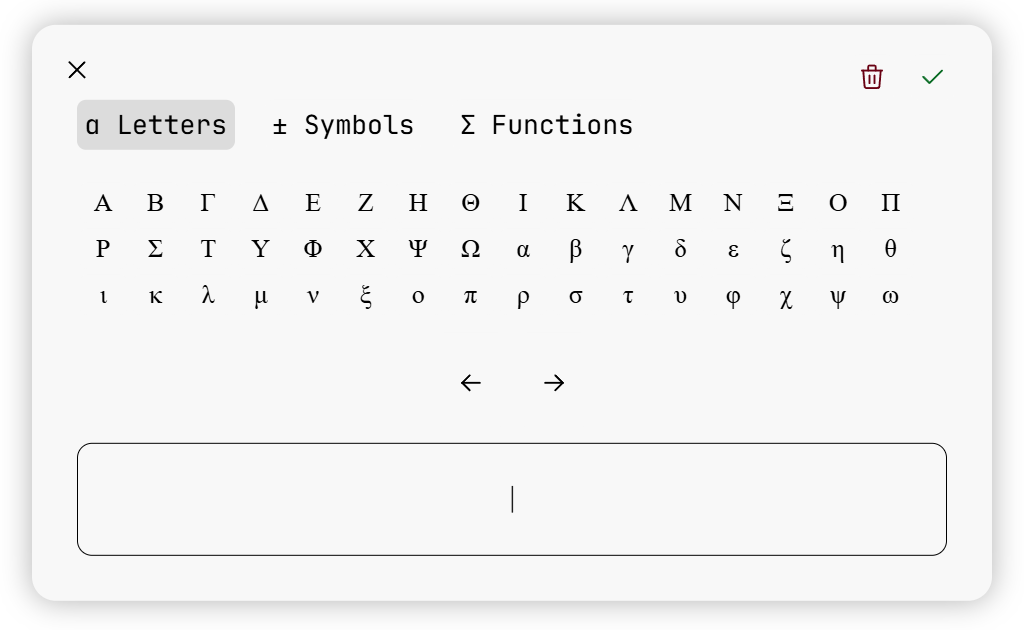
GUIMath defines the following classes -
- The root element containing the entire widget has a class of
_guimath_editor_window. - There is a row of controls on top of the widget, which has the close button, the clear equation button, and the save button. This row has the class
_guimath_editor_controls. - The row that contains the tab navigation (“Letters”, “Symbols”, “Functions”) has the class
_guimath_tab_container_container, and each tab button has the classguimath_tab_container.- The active tab is given a class of
_guimath_active_tab.
- The active tab is given a class of
- The elements contain the actual greek letters, symbols, or functions are given the class
guimath_tab.- The element containing the greek letters is also given the class
_guimath_letters_tab. - The element containing the symbols is also given the class
_guimath_symbols_tab. - The element containing the functions is also given the class
_guimath_functions_tab.
- The element containing the greek letters is also given the class
- Each button in each of the three tabs is given the class
guimath-btn.- Each button in the Letters tab is given the class
_guimath_greek_letter. - Each button in the Symbols tab is given the class
_guimath_operator. - Each button in the Functions tab is given the class
_guimath_function.
- Each button in the Letters tab is given the class
- The navigation buttons below the three tabs are both given the class
_guimath_dir_button.- The left arrow button is given the class
leftArrowButton. - The right arrow button is given the class
rightArrowButton.
- The left arrow button is given the class
- The display where the equation being created is shown is given the class
_guimath_editor_display.
Form Input HTML Structure
Once you call GUIMath.createEquationInput(), all elements which match the selector you pass are hidden by setting their display to none. Then the GUIMath equation input element is inserted into the DOM right after each matched input. The equation input element consists of the following simple HTML -
<div class="_guimath_equation_input_wrapper">
    <div class="_guimath_equation_input">
        <button type="button" class="_guimath_insert_equation_button">
            Add Equation
        </button>
        <div class="_guimath_equation_input_preview"></div>
    </div>
</div>
The GUIMath equation input also supports basic input validation. If the user has entered an equation, the equation input is given a class of _guimath_equation_input_valid. If the user clears their equation or closes the GUIMath editor widget without entering an equation, the equation input is given a class of _guimath_equation_input_invalid. When the equation input is injected into the DOM, neither of these classes are present on the input element, they are only added after the user interacts with the input.